

Table Of Contents
Button
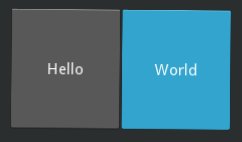
The Button is a Label with associated actions
that are triggered when the button is pressed (or released after a
click/touch). To configure the button, the same properties (padding,
font_size, etc) and
sizing system
are used as for the Label class:
button = Button(text='Hello world', font_size=14)
To attach a callback when the button is pressed (clicked/touched), use
bind:
def callback(instance, touch):
    print('The button <%s> is being pressed' % instance.text)

btn1 = Button(text='Hello world 1')
btn1.bind(on_press=callback)
btn2 = Button(text='Hello world 2')
btn2.bind(on_press=callback)
If you want to be notified every time the button pressed state changes, you can bind
to the Button.pressed property:
def callback(instance, value):
    print('My button <%s> pressed state is <%s>' % (instance, value))
btn1 = Button(text='Hello world 1')
btn1.bind(pressed=callback)
Kv Example:
Button:
    text: 'press me'
    on_press:
        print("ouch! More gently please", args[1].pos)
    on_release:
        print("ahhh", args[1].pos)
    on_pressed:
        print("my current pressed state is {}".format(self.pressed))
- class kivy.uix.button.Button(**kwargs)[source]
Bases:
ButtonBehavior,LabelButton class, see module documentation for more information.
Changed in version 1.8.0: The behavior / logic of the button has been moved to
ButtonBehaviors.- background_color
Background color, in the format (r, g, b, a).
This acts as a multiplier to the texture color. The default texture is grey, so just setting the background color will give a darker result. To set a plain color, set the
background_normalto''.Added in version 1.0.8.
The
background_coloris aColorPropertyand defaults to [1, 1, 1, 1].Changed in version 2.0.0: Changed from
ListPropertytoColorProperty.
- background_disabled_down
Background image of the button used for the default graphical representation when the button is disabled and pressed.
Added in version 1.8.0.
background_disabled_downis aStringPropertyand defaults to ‘atlas://data/images/defaulttheme/button_disabled_pressed’.
- background_disabled_normal
Background image of the button used for the default graphical representation when the button is disabled and not pressed.
Added in version 1.8.0.
background_disabled_normalis aStringPropertyand defaults to ‘atlas://data/images/defaulttheme/button_disabled’.
- background_down
Background image of the button used for the default graphical representation when the button is pressed.
Added in version 1.0.4.
background_downis aStringPropertyand defaults to ‘atlas://data/images/defaulttheme/button_pressed’.
- background_normal
Background image of the button used for the default graphical representation when the button is not pressed.
Added in version 1.0.4.
background_normalis aStringPropertyand defaults to ‘atlas://data/images/defaulttheme/button’.
- border
Border used for
BorderImagegraphics instruction. Used withbackground_normalandbackground_down. Can be used for custom backgrounds.It must be a list of four values: (bottom, right, top, left). Read the BorderImage instruction for more information about how to use it.
borderis aListPropertyand defaults to (16, 16, 16, 16)